Monday, 19 May 2025

Platform Reports Library Opens Reports and Books Directly in Excel

Prior to this release 25.05, users had to launch the Report in HTML or PDF or launch the Book in PDF and then export to Excel. This required the Report or Book to be run twice. 


From this release 25.05, the Platform Reports library enables user to open Reports and Books directly in Excel via an icon.

This feature streamlines the user interaction and runtime when using Excel with Reports and Books.

It is recommended for users to have Preview POV enabled in Tools > User Preferences > Reports, so users can set the POV before launching the Report or Book in Excel.


This feature applies to: 

  • Enterprise Profitability and Cost Management
  • Financial Consolidation and Close
  • FreeForm
  • Planning
  • Tax Reporting

Business Benefit: This enables to quickly open the Excel format of Reports and Books by clicking the Excel icon next to the Report. 


Created by Mohit Jain and Megha Gupta

New Application Role Reports - Manage for Power user to manage Reporting artifacts

Before the 25.05 update, Power Users had the same ability to manage reporting artifacts as Service Administrators. This new role will update the access rights of Power Users.

The new Reports - Manage role allows users to:

  • Add, edit, duplicate, and delete reporting artifacts.
  • Import and export reporting artifacts based on permissions set on them.

Starting with this update, users that are assigned a new Power User predefined role will no longer be able to manage reporting artifacts. To avoid disruption, existing Power Users will be auto-assigned the Reports - Manage role with the 25.05 update. Service Administrators can deprovision this role if needed. New Power Users will not automatically be assigned this role and will require explicit role assignment.

This Role applies to: 

  • Enterprise Profitability and Cost Management
  • Financial Consolidation and Close
  • Freeform, Planning
  • Tax Reporting

Business Benefit:  The Reports - Manage role improves security, compliance, and efficiency by providing granular control over reporting artifacts. It provides the ability to delegate the reporting artifact management to non-Service Administrators. On the other hand, it also removes this ability to newly assigned Power Users unless explicitly allowed by Service Administrators.


Created by Mohit Jain and Megha Gupta

New Copy Pipeline Feature in Data Integration

Prior to this feature, there is no option to open existing pipeline, and users had to create new pipeline always.

A new Copy Pipeline feature is available that enables to create a Pipeline identical to another Pipeline but with a different name. Pipeline can be copied within the same environment or to a remote environment.

The Copy Pipeline option is available from the home page by clicking ... next to the Pipeline to copy and then selecting Copy from the Task Menu:


You are then prompted to select Copy Pipeline options including:

  • New pipeline name
  • New Pipeline code
  • Connection


This feature applies to: 

  • Enterprise Profitability and Cost Management
  • Financial Consolidation and Close
  • FreeForm
  • Planning
  • Profitability and Cost Management
  • Tax Reporting

Business Benefit: Use the copy Pipeline feature to create a new copy of a Pipeline definition with identical connections and job type information. You might use this feature when you want to copy a Pipeline definition in a test environment, or you want to copy a source Pipeline as a model for another Pipeline.


Created by Mohit Jain and Megha Gupta

Validations to Disallow Invalid Date Range Selection for Report Generation

Oracle Enterprise Performance Management Cloud has implemented new validations that prevent selecting an invalid date range during Access Control report generation. Oracle Cloud EPM ensures that only valid date range is used during Access Control report generation through Access Control screens, EPM Automate, and REST APIs.This feature is automatically available in EPM Cloud instances.

As a result, users can no longer select invalid date ranges for generating these reports.

  • Invalid Login Report
  • Role Assignment Audit Report
  • Group Assignment Audit Report
  • User Login Report

The Audit Retention Period (days) setting in the Oracle Cloud IAM controls the retention period (maximum of 90 days) for the audit data presented in the Invalid Login Report and the Role Assignment Audit Report. Cloud EPM maintains the audit data displayed in the Group Assignment Audit Report and User Login Report for a maximum of 120 days.The following validations are performed for the start and end dates:

  • The start date cannot be earlier than the allowed maximum retention period from the current date.

  • The end date cannot be later than the maximum retention period from the start date. 


  • The end date cannot be earlier than the start date.

 
This feature applies to: 

  • Financial Consolidation and Close
  • Planning
  • Tax Reporting
  • Freeform
  • Enterprise Profitability and Cost Management
  • Narrative Reporting
  • Profitability and Cost Management
  • Enterprise Data Management
  • Account Reconciliation 

Business Benefit: These validations ensure that the generated reports don't provide unexpected results or empty pages because of invalid date range.


Created by Mohit Jain and Megha Gupta

New Navigation Flow Option: User Access View

Prior to the release of May 25.05 patch, Navigation flow designers had to collaborate with each user to see the runtime view of a navigation flow for that user (or have a user defined on the designer's system with similar access)

The User Access View option provides navigation flow designers with a way to preview the runtime view for any user assigned to a group associated with the navigation flow.

Now designers can easily see the runtime view of the navigation flow for any user that is assigned to a group associated with the navigation flow. The User Access View option is only enabled when the navigation flow is associated with a group. This option is not enabled for the Default navigation flow or any navigation flow not associated with a group.

To view the User Access View option for a navigation flow:

  1. On the Home page, click Tools, and then click Navigation Flows.
  2. Highlight the name of the navigation flow to preview.
    Note: The navigation flow must be associated with a group and it cannot be the Default navigation flow.
  3. In the upper right-hand corner of the page, click Actions, and then select User Access View.


This feature applies to: 

  • Financial Consolidation and Close
  • Planning
  • Tax Reporting
  • Freeform
  • Enterprise Profitability and Cost Management

Business Benefit: 

This feature enables navigation flow designers to instantly see which artifacts in a navigation flow are visible to which users and quickly make changes, if needed.

Thank you!


Created by Mohit Jain and Megha Gupta


Monday, 13 May 2024

Can FCCS supports granular level data reporting?

Problem Statement

There is a need of Profitability report by legal entity, by account and department as well as by location. Ask is can FCCS generate profitability by department reports? Can FCCS generate profitability reports at lowest level?

FCCS functionality

Yes. Why not! It completely depends on how flexible you configure your application. You can definitely generate a report at lowest level you loaded the data.

FCCS is designed based on industry best experiences. FCCS provides inbuild 11 standard dimensions and upto 4 custom dimensions (If the application is enabled with the Multi-GAAP reporting option, you can create three Custom dimensions.)  Based on business requirements, 4 custom dimensions can be chosen. Once data will be loaded into FCCS across the custom dimensions, reports can be built.  It completely depends on how application is configured. There are few one-time setups that you have to consider and make the application flexible to generate such reporting.


Note -

1.If you still have 2 custom dimensions in your application, FCCS application needs to be updated to 4 custom dimensions (Extended Dimensionality update).

2. When the Extended Dimensionality update is applied, your existing application (with 2 dimensions) will no longer be available. You must create a new application (with 4 custom dimension). You cannot modify the number of dimensions in an existing application.

Solution 

In FCCS to meet this requirement you should have Legal Entity, Account, Department and Location as your dimensions and while generating the report you should consider creating in such a manner, that you don’t face performance issues.

You can generate a Financial Reporting (FR), Management Reporting (MR) or Smart view (Template based) report. FR is not recommended as will have to migrate to MR at a point of time so it's better to create a report in MR or Smart view. 

Point to consider -

1. Drill Down functionality should be applied when we have need to see data across all levels of dimension. User can start drilling down to top member and reach out to desired level of dimension.

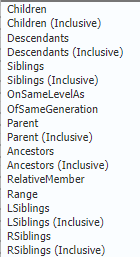
2. Instead of hard coding of members in selection window, use the member functions like Children, Descendants functions.


3. Based on business requirements, Financial Report or Management Reports can be scheduled as well and reports in email to inbox/ placed to specific folder.

4. Keep the unrequired dimensions to POV.


Thank you!

Created by - Megha Gupta & Mohit Jain

Wednesday, 8 May 2024

Announcement: Data Management Feature Migration to Data Integration

Data Integration is the next generation of the Data Management user interface, enabling users to easily build and manage Cloud EPM integrations.

 As feature parity between Data Integration and Data Management becomes complete, Data Management features will be turned off, and users will use the new Data Integration user interface instead. This transition is gradual.

The user interface pages listed in the table below are no longer available in Data Management but are available in Data Integration. 


Please note -

  • Data Management is not going away – only few features will move to Data Exchange.
  • Profitability and Cost Management customers are not affected by the migration and do not see a change in their Data Management user interface. 
  • REST APIs are not impacted by this change.
  • Integration definitions built with Data Management are also visible in Data Integration, which enables an easy transition. (Data Integration is a new user interface on the Data Management data model and does not require migration of content from Data Management to Data Integration).
  • Anu additional new integration features will only be included in Data Integration, and will not be back-ported to Data Management. 
  • Critical bug fixes and security fixes will still be made to Data Management until all features are fully migrated. In addition, all features from Data Management will be migrated to Data Integration with the exception of the following:
  • The batch feature will be replaced by the new Pipeline feature. 
  • The Report Definition feature will not be migrated, only the Report Execution feature.
  • The ability to create new Custom Applications in Data Management will no longer available, and we should use the “Data Export to File” application type instead.

These changes apply to ARCS, FCCS, TRCS, Enterprise Profitability and Cost Management,  FreeForm, Planning, and Planning Modules

Thank you!

Tuesday, 7 May 2024

Major update for Audit requirements - Retain comments, attachments and job status after a user is removed

Previously, when a user was removed, the user’s comments, attachments, and job status records were also deleted. This meant that the user’s activity was lost.

In a major update from April 2024 update, now, the user activity records are retained for comments, attachments, and job status records, even after the user is removed. For example, these records continue to be displayed in:
  • Comments and attachments on cells in forms
  • Comments and attachments that are part of a maintenance snapshot
  • The job status on the Jobs page
  • Job status records that are imported and exported using EPM Automate or EPM REST APIs
This change is applicable to only Enterprise Profitability and Cost Management, Financial Consolidation and Close, FreeForm, Planning, Tax Reporting.

Major business benefit of this update is that user activity records are retained even after a user is removed for audit purposes and to keep history of the user actions.

Thank you!

Loading Oracle ERP Cloud Exchange Rate (FX) to Oracle EPM Cloud

From May-2024 update, In Data Integration, customers can now extract exchanges rates (FX rates) from the Oracle ERP Cloud using an ERP Cloud FX Rate adapter. The adapter is used as a data source in Data Integration. The adapter enables customers to select daily conversion rates for specific combinations of foreign currency, dates, and conversion rate types. This feature is only available for the standard load method.

The ERP FX Rate adapter supports period mapping requirements for the FX rate. The source data from the Oracle ERP Cloud is provided by the conversion date. Date-based FX Rate data is converted to EPM periods so it can be easily mapped and loaded to EPM Cloud applications. 

This update is applicable to FCCS, FreeForm, Planning, Tax Reporting

EPM Cloud customers who wish to use the new adapter are required to be on Oracle Fusion Cloud Financials Update24B in order to extract FX rates from the Oracle ERP Cloud.

Business Benefit: The ERP Cloud FX Rate Adapter is a purpose-built adapter, which enables customers to pull FX rates from the Oracle ERP Cloud without having to build custom BI Publisher reports. Using this feature, organizations have ready access to exchange rate values when determining revenue allocation for currency-denominated revenue streams.

Thank you!

Performance Improvement - Enabling the faster load time for the Jobs page

As per new updates from April 24, the Jobs page and the Jobs Filter will display only last day's data. Before this update, the Jobs page used to default to display three days of data under Recent Activity. Now the Jobs page defaults to display only the last day's data. Similarly, the filter’s Start Time and End Time dates default to yesterday and today to have only a one day difference.

This feature enables a faster load time for the Jobs page, allowing you to more quickly view the status of recent activity.

This feature is only applicable to Financial Consolidation and Close, FreeForm, Planning, Tax Reporting.

To view the Jobs page:

  1. Click Application, and then click Jobs.
  2. View the jobs list under Recent Activity to see the last day's activity.
  3. To change the default display, click the Filter icon.


Thank you!


Ability to Create and Manage External Users

Service Administrators can now use the Manage Users tab under Access Control to create, edit, and delete external users (users who are not p...